

Improve Security Assessment Efficiency with IDApython
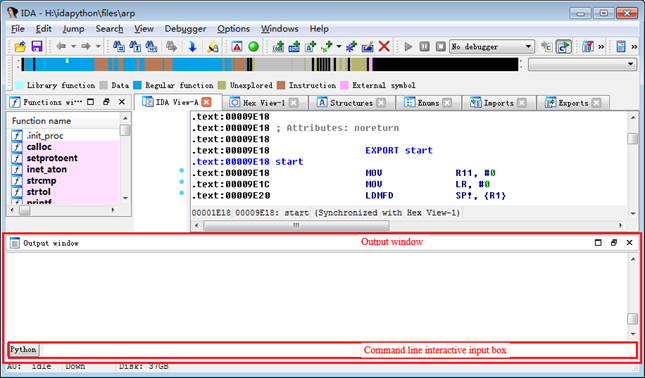
1 IDApython IntroductionAs a professional decompilation analysis software, IDA provides an interactive programming plug-in called IDC for improving analysis efficiency. With the widespread use of Python, after version 6.8, IDA provides a python-based interactive programming plugin IDApython. IDApython fully complies with Python's syntax, and allows you to use all the python libraries and functions, so it not only enriches the functionality of the script, but also lowers the threshold for IDA scripting. Functionally, IDApython is a superset of IDC, and it even has a module responsible for providing functionality of all functions in IDC. IDApython contains three modules - idaapi.py, idautils.py and idc.py, and the three files are located in the python directory of the IDA folder. Idaapi.py contains functions for accessing IDA's underlying data; idautils.py contains a number of utility functions; idc.py contains functions responsible for providing IDC scripting functionality. There are relatively small amount of information available about IDApython, we recommend you to directly read the source code of the above three module files to learn about the function content and functionality contained in each module. 2 Introduction to Security Assessment IssuesOur company clearly stipulates in the coding standard that it is forbidden to use dangerous functions, but in the development process, there are still some calls and uses of non-secure C functions for various reasons, resulting in security risks such as memory out of bounds. Some programs, after using the allocation function to allocate memory, directly read and write to the returned memory address without judging whether the memory allocation is successful, which is also a security risk. Both types of issues are within the scope of security assessment. Since the amount of binary files obtained during the security assessment is large, it is time-consuming and labor-intensive to manually check all the security functions in all files. Generally, sampling is used to find the problem, and then the developer checks, locates and fixes all the codes, but this is likely to cause omissions, resulting in incomplete rectification, rework and other situations. By writing the IDApython script, a one by one full-automatic analysis of all the files in the assessment file list can be achieved, and a list of files with problems, call locations of related functions and context disassembly code will be outputted. Thus a precise positioning of problems is achieved, based on which the developer can fix the problem and verify after fixing, so a thorough rectification is achieved. 3 How to use IDApythonIDA provides two ways to execute IDApython script, namely single-line debug editing mode and script file execution mode. Under single-line debug editing mode, the command is inputted through the command line input box located at the bottom of the output window at the bottom of the IDA window, and is executed by pressing Enter, as shown below:
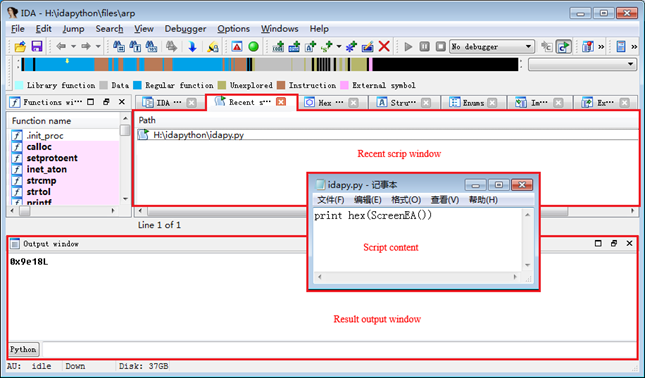
Under script file execution mode, you select the IDApython script to be executed by "File"->"Script file…" in the IDA menu. After selecting the IDApython script to be executed, a "Recent scripts" tab window will be added to the IDA interface. In the window page, the corresponding script file will be executed by double-clicking. The result of the script will be output to the output window at the bottom of the window. After the IDApython script is executed, the IDA window interface may be as follow:
Both the above examples of two execution modes use an instruction ScreenEA(), the definition of which can be found in idc.py, and the content inside the quotes is comment. The code content is as follow:
The functionality of the ScreenEA() function is to return the address of the current cursor. The address returned in the example is also the entry point address of the file, which is because the default address of the cursor is the entry point of the program after the file is automatically analyzed by IDA. It should be noted that when calling the function in idc.py in the IDApython script, the function does not need to be introduced, and can be called directly in the script. 4 IDApython ImplementationIn this paper, the method of automated analysis is to first try to obtain the address of the function in the file; then obtain the call address list of the function through the cross-reference table of the function name address; and then get the context disassembly code of the function call address through the call address of the function. Non-secure Function CheckFor the use of the non-secure function, after obtaining the function call address list in the second step, by judging the length of the address list, whether the file has the function call can be confirmed, and the obtained context disassembly code can be used to help the developer to locate the call location of the function when rectifying. The following implementation code does not contain the code to get the function call address context disassembly instruction, but only the confirmation of the function call. The specific code is as follow:
The code first obtains the address of the function name imported by the program through the LocByName function, if the returned value is BADADDR, the function is not referenced in the analysis file; then obtains the cross-reference list of the function through the CodeRefsTo function, each element in the list is the address of the function called, if the list is not empty, there is a call to the function, otherwise the function is only introduced and not called in the code. The definitions of the LocByName function and the CodeRefsTo function can be found in idc.py. To reduce the output of the result, two lines of break code have been added to the code. To get the complete result, simply comment out the two lines of break code in the code. Wait() in the main function of the code should be added when writing the code, otherwise it may happen that the IDApython automated analysis script does not have any output when IDA perform analysis through the script, which is because the file parsing by IDA is not finished when the IDApython script is executed. The functionality of Wait() is to wait for IDA to complete the parsing of the file before the functional script of the IDApython script is executed. If you don’t want to add the Wait() function to the IDApython script, the solution is to find the ida.idc file in the idc folder of the IDA working directory, and add a Wait() function to its main function. An example is as follow:
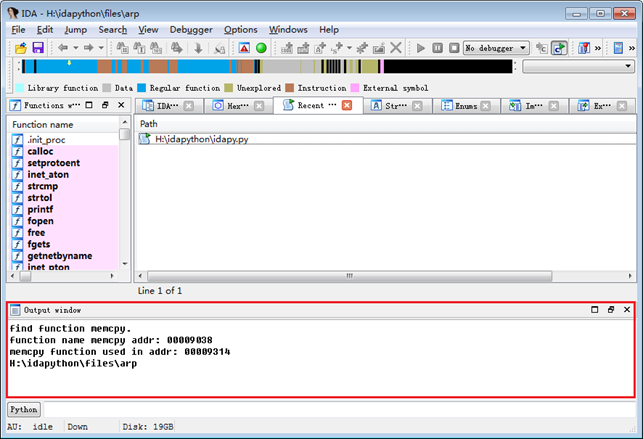
Adding the Wait() function to the ida.idc file avoids having to write this function to the IDAPython script every time, which is because IDA will first execute the above mentioned ida.idc script before executing the specified IDApython script after it is started. The output of the above code is as below:
Memory Allocation Returned Value JudgmentFor the problem that the returned value is not judged after using the memory allocation function, the disassembly code after the function is executed after capturing all the function call related codes needs to be analyzed, and the call that we can clearly confirm its returned value has been judged needs to be filtered, otherwise a lot of manual verification work will be caused. The specific code is as follow:
The logic of the code is same as that of the non-secure function call. After obtaining the cross-reference table, ten consecutive disassembly instructions under the address are obtained through the get_code_list function, and then whether the returned value of the function call is judged is filtered through like_error_code function. The function call and the code block after the call that failed to be filtered will be recorded for manual analysis and inspection. The function get_code_list first obtain the disassembly instruction under the specified address through GetDisasm function, then get the instruction address of the next instruction under the specified address through NextHead function, and finally loop to get the next disassembly instruction. As with the IDApython functions involved earlier, the definitions of the GetDisasm function and the NextHead function can also be found in idc.py. The like_error_code function’s judgment is based on, in the subsequent instruction of the function call, whether there is an operation that when executed against R0 register can affect the flag register. The possible forms of code that can be filtered out are as follows:
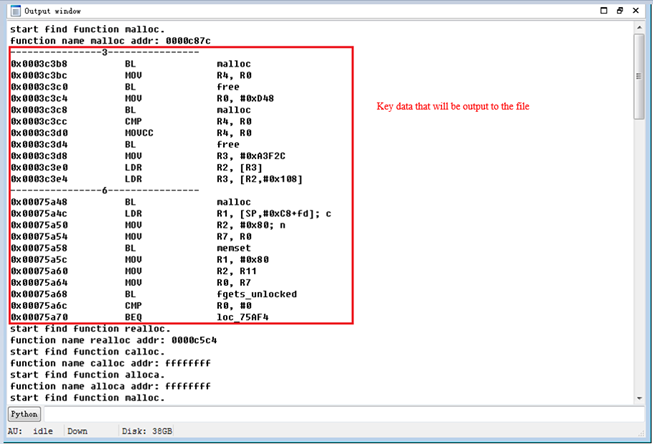
The filter function can filter the above two forms of code, and also contains some other instructions (omitted here) that can be used to judge the value in R0. To analyze the omission of the filter function, the script outputs the key data in the output data in the IDA output window to the file. The output of the IDA output window contains the complete data output, as shown in the following figure:
As can be seen from the above output, the cross-call of malloc function is at least six. Code blocks identified as having returned value judgment are filtered and not output, only the third and sixth code blocks are output. We can see that the two code blocks do not judge the returned value. For the realloc function, it can be found from the output that the script finds the function name address, but the cross-reference table of the function name address is empty, indicating that the function is only imported but not used by the analysis file. The other two function name output results show that their function name address is 0xffffffff, indicating that the function has not been imported in the analysis file. The sample output is a very good case of code block filtering. In actual operation, some code blocks may not be filtered, and the filtering result needs manual analysis. In fact, the filtering judgment here is relatively rough, only the first instruction that operates on the register that saves the returned value after the function is executed is judged, and many cases where the returned value is judged cannot be filtered out. For example, it is impossible to filter the case that the returned value is assigned to other register which makes judgement on the returned value; for another example, the execution flow of the program is not recognized, which may cause errors. If you want to achieve better filtering results, you need to write more complex scripts to identify the various situations in the disassembly code after the function call. In the above code, when obtaining the disassembly instruction after the function call address, the complete instruction under the address is directly obtained, then it identifies by judging whether the instruction code and the operation instruction string are included in the assembly instruction. In fact, IDA also provides GetMnem function and GetOpnd function to get the instruction code and operand of the instruction. We can also make a separate comparison judgment after we directly obtain the instruction code and operand of the instruction. 5 IDA Batch ModeIDA does not support multi-threading, its batch mode is to perform analysis by executing multiple IDAs simultaneously through some methods to improve the efficiency of analysis. When using the IDA batch mode, the command line mode of IDA is usually adopted to reduce the resource consumption of IDA. The commonly used parameters under the IDA command line mode are -A and -S. -B parameter can be used to automatically generate related database and disassembly code. The main functionality of the -A and -S parameters is described below:
The following is the code written in python that automatically calls the IDApython analysis script by traversing the file under the specified path:
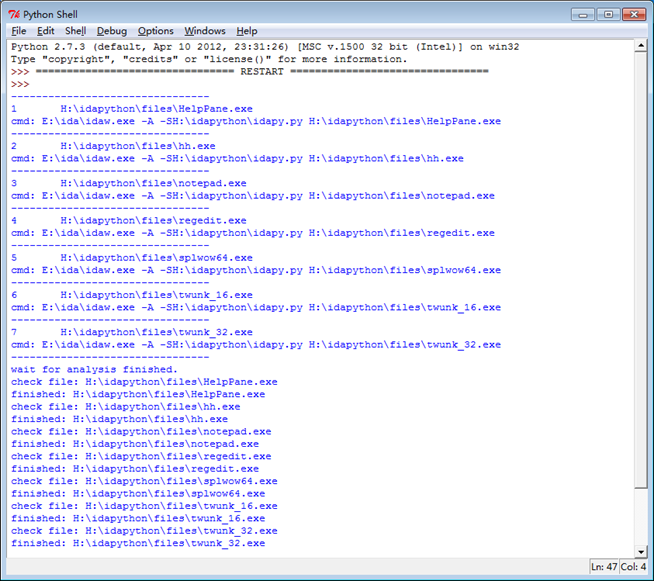
To avoid popping up the command line window when calling and executing IDA analysis file, the code does not directly use the system function to directly invoke the command, but starts the command through the POPEN function of the sub-processing module, thus a IDA background silent automatic analysis is achieved and a desktop pop-up command line IDA analysis window is avoided. In order to prevent the excessive IDA from being opened for analysis at the same time, the IDA analysis process number limit is added in the above code. After being started, the wait function make the command waits until all files have been analyzed. The output of the above code is shown below:
The above code forces all of the input files to be parsed by IDA's 32-bit disassembler, and an x64-bit input file cannot be parsed, so a better way is to increase file bit judgement in the code so as to parse 32-bit and 64-bit files with their respective disassembler. 6 Sum-upAn analysis of the target sample set by IDA's IDApython script can be basically realized by the above script. If you want to achieve better analysis results, many details need to be improved in the above code. The major time cost of IDA automated analysis is, when there are multiple analysis tasks for the same sample, a maximum number of IDA processes can only be set to 11 in the code. We need to adjust the number of processes according to the specific performance of the device to prevent IDA from occupying too much resource causing system hang. In addition, the IDA batch mode script will generate an error when analyzing, if there are files with the same file name but different extensions in the same directory, which is because when IDA performs file parsing, it will create several IDA analysis related files with special extensions and same filename as that of analysis file under the current directory, and when two files with same filename but different extensions are analyzed at the same time, a conflict of analysis related files created during the IDA analysis occurs. The solution is to make sure that all files in the same directory have different file names, or create a unique directory for each file as a directory for sample analysis when analyzing the file. The solution one can be achieved by using the md5 naming of the file, with the advantage of simple operation and disadvantage of having to match the analysis result with the original file name, and the process file generated when the IDA parsing file will be left in the sample directory. So the solution two is relatively better. The IDA script supports a lot of functions, and can achieve very powerful functionality. Other analysis purposes for any target sample set can be achieved by modifying the IDApython automated analysis script in the above code. |


-
Randall 2018-10-31 09:39:43 Great!